
What's new

Part Color Palette

jfleming

Alibre Super User
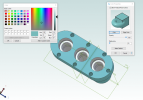
Another "Nice To Have" would be the ability to save a custom/standard color palette somehow. This would be beneficial for us, as a company with multiple users. Currently it is just willy-nilly and everyone is free to pick their own colors with this setup and there is no way to standardize it in any way. Even if I were to populate the "Custom Colors" for my own self, they never seem to "stick". One time they are there and the next they are gone. Not sure if it is update related or what. Plus it is limited as to how many ink wells there are to pick from. The current system feels like I'm using MS Paint in 1996.

colors.png
 
Check out this thread:

 
Hello Harold.

I like the steam engine stuff, have had a few. I am looking for some metallic colors for my models. I tried adjusting the color pallet with no success. Anything out there for Steel or chrome?

Thanks-

Sheldon
 
The current system feels like I'm using MS Paint in 1996.
A personal, longstanding pet peeve of mine. It is much improved in v29. And it will remember them(!). So you can't have a central color repo, but you can standardize them once per machine and never worry about it again. As well, the default colors are pastels which end up looking way better than highly saturated colors in the actual 3D model once applied, so it's much harder to get bad colors.

1747083714977.png
1747083719590.png
1747083724678.png
 
Last edited:
The best I've been able to come up with is to use the metal colors from KeyShot. @Cator wrote the attached script that will assign a color based on the material selected from the drop-down list. If you edit the script you can modify the colors to your liking.
If you do an internet search there are a myriad of sites that have metal color palettes and from what I've seen they don't seem to follow a "standard". Although KeyShot claims to have "scientifically accurate materials" so I tend to rely on its color pallet.

And Please add your version/level of Alibre to your forum signature. That makes it easier to determine how to answer support type questions on the forum.
 

Attachments

The best I've been able to come up with is to use the metal colors from KeyShot. @Cator wrote the attached script that will assign a color based on the material selected from the drop-down list. If you edit the script you can modify the colors to your liking.
If you do an internet search there are a myriad of sites that have metal color palettes and from what I've seen they don't seem to follow a "standard". Although KeyShot claims to have "scientifically accurate materials" so I tend to rely on its color pallet.

And Please add your version/level of Alibre to your forum signature. That makes it easier to determine how to answer support type questions on the forum.
 
Given that scripts are not available for Atom 3D, one suggestion I'd make is to download Cator's script and open it in Notepad to see the color numbers that are assigned for each material. Then you can manually apply them based on the material you assign to each part. Kind of a pain but at least it will give you some "standard" for material colors in your models. What makes it a bit difficult is that Alibre does not do rendering, only coloring. To get a real life appearance for Stainless Steel, brushed of plain, and/or Chrome you really need a rendering program. (KeyShot for Alibre is only available for Expert)
But you might try Blender. It's free and, I think, could be used only for its rendering capabilities. Do an internet search on Blender Metal Rendering to see what images come up.
 
Back
Top