
You are using an out of date browser. It may not display this or other websites correctly.
You should upgrade or use an alternative browser.
You should upgrade or use an alternative browser.

HaroldL
Alibre Super User
I'm not sure the Loft tool will get what you want if you want the top to be radiused up to the square corners I think a different work flow will be needed.
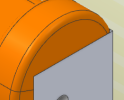
Here's a screen shot of the part using a Revolve Cut along with a couple of Extrude Cuts to trim the top edge to a 4 mm radius.
The Revolve Cut is a Dual Angle so the angles can be edited to change where the Extrude Cuts are positioned around the edge.
Does that look like what you are trying to achieve?
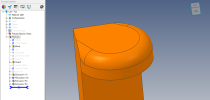
Here's a screen shot of the part using a Revolve Cut along with a couple of Extrude Cuts to trim the top edge to a 4 mm radius.
The Revolve Cut is a Dual Angle so the angles can be edited to change where the Extrude Cuts are positioned around the edge.
Does that look like what you are trying to achieve?
Attachments

NateLiquidGravity
Alibre Super User
Here's what I would do to the one shown in the last post.
Before the fillet do two triangle cut extrusions - one for each direction.
Then fillet the resulting edges. Maybe using variable radius.
If that's not clear let me know and I'll make a model later.
Before the fillet do two triangle cut extrusions - one for each direction.
Then fillet the resulting edges. Maybe using variable radius.
If that's not clear let me know and I'll make a model later.
HaroldL
Alibre Super User
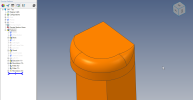
Is this closer to what you want? I tried Nate's variable radius fillet on this and needed to start with the initial radius smaller than 4 mm. I then applied the two VR Fillets and ended with a revolve boss. Alibre choked on using a variable fillet with the same large radius as the initial revolve cut so the extra step was needed.
I also noticed that the display of odd lines made their appearance in this model. Don't know what causes them but it is odd.
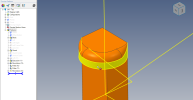
I also noticed that the display of odd lines made their appearance in this model. Don't know what causes them but it is odd.
Attachments
NateLiquidGravity
Alibre Super User
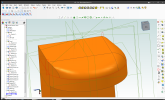
Ok I tried my idea and a variation of it and Alibre Design Just couldn't get fillets (variable or otherwise) to work right. I did get something fairly decent using every trick in the book.
NateLiquidGravity
Alibre Super User
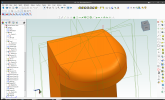
HaroldL
Alibre Super User
Can you say how this part is going to be made, machined, molded or 3D printed?
Here's another workflow that gets maybe a little closer to what you want. It still doesn't transition to a point in the corners but it does leave the corner points.
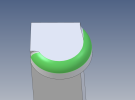
In this example IF Alibre could loft between sketch 6 and sketch 7 and use sketch 8 as a guide curve I think that would give the results you want. The same thing would need to be done in the opposite direction with selective use of guide curves. I have had some success in the past creating Lofts similar to this but this one kills Alibre on every attempt. (If I had a seat of SolidWorks this wouldn't be too difficult to make with some surfacing tools. Just sayin'.)
You know, @Oldbelt usually has good results with Lofts, maybe he will show up with an example to put our efforts to shame.
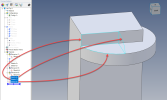
Here's another workflow that gets maybe a little closer to what you want. It still doesn't transition to a point in the corners but it does leave the corner points.
In this example IF Alibre could loft between sketch 6 and sketch 7 and use sketch 8 as a guide curve I think that would give the results you want. The same thing would need to be done in the opposite direction with selective use of guide curves. I have had some success in the past creating Lofts similar to this but this one kills Alibre on every attempt. (If I had a seat of SolidWorks this wouldn't be too difficult to make with some surfacing tools. Just sayin'.)
You know, @Oldbelt usually has good results with Lofts, maybe he will show up with an example to put our efforts to shame.
Attachments
HaroldL
Alibre Super User
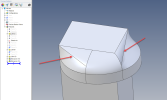
Okay, here's my last attempt at this. My thought was to create the lofted bits first then build the rest of the part after. It seems that Alibre still has a problem creating a loft between sketches that have a different number of elements. In this case going from a 3 element sketch to a 4 element sketch. Even after editing the sketches for the curved/domed shape with multiple elements of an elliptical arc Alibre still failed to create two lofts with a smooth transition. I've pointed out the offending lofts in the uploaded image and the one on the right is the worst. Maybe Alibre Support can take a look at this part to see how it can be created.
Attachments
NateLiquidGravity
Alibre Super User
Harold,
Did you check out what tricks I did to make lofts work (work being an opinion in this case)?
Did you check out what tricks I did to make lofts work (work being an opinion in this case)?
NateLiquidGravity
Alibre Super User
To best describe it I wanted to use the face to face loft but it doesn't work for me when the 2 faces share and edge and especially not for 3 faces. So I made a grove cut to separate the faces. Then later filled it in and removed any excess.

Stuart
Senior Member
Nate, you got pretty close. 
I don't use lofts very much, partly because I get frustrated trying to get the effect I want.
In the loft dialog, what does the tangent angle setting do? I expected that since the tangent it produced was 90 degrees from what I wanted, I could change that setting to 90, but that doesn't help. And the magnitude setting makes even less sense to me. Varying it usually didn't show a change or pupped up an error.
I don't use lofts very much, partly because I get frustrated trying to get the effect I want.
In the loft dialog, what does the tangent angle setting do? I expected that since the tangent it produced was 90 degrees from what I wanted, I could change that setting to 90, but that doesn't help. And the magnitude setting makes even less sense to me. Varying it usually didn't show a change or pupped up an error.
HaroldL
Alibre Super User
Looks like your method worked out a lot better. I don't use the face to face loft much, mainly because it doesn't allow guide curves, so it's not in my train of thought when working on lofts.To best describe it I wanted to use the face to face loft but it doesn't work for me when the 2 faces share and edge and especially not for 3 faces. So I made a grove cut to separate the faces. Then later filled it in and removed any excess.
NateLiquidGravity
Alibre Super User
The best as I could get your original using those settings: it needed to be -90° for the top's tangent setting which also made "love handles" on the sides of the rectangle which were unwanted. Potentially/maybe/with some tweaking - it could have been done that way and then chopped off the extra but I wasn't happy with the shape. As far as I can tell it's 100% trial and error getting the magnitude right. I will say this adventure makes me more aware of how badly Alibre needs to fix the error dialogs when previewing.In the loft dialog, what does the tangent angle setting do? I expected that since the tangent it produced was 90 degrees from what I wanted, I could change that setting to 90, but that doesn't help. And the magnitude setting makes even less sense to me. Varying it usually didn't show a change or pupped up an error.
